Service Desks and Language Models
Premise
Service Desks have a big job - to be the front line of a support function. To resolve, filter, and escalate a myriad of service requests and incidents being raised every day.
Much has been said about various “shift left” approaches. In an ideal world, majority of queries would be dealt with via self-service and AI chatbots, only involving human operators in the most nuanced cases or those otherwise requiring human judgement.
Surely there is a practical limit to how far you can shift left? Are we about to see first line support functions offloaded to LLMs, turning all of customer service into AI chatbot? Probably not in the short term, but very possibly a few years down the line as models keep advancing and price per token falls.
In my view, a future Service Desk is one comprising specialized teams of human analysts supervising much larger teams of AI Service Agents - monitoring quality and applying human judgement where automated systems reach their limits.
As we build that future, what is that intermediary step? Could we augment existing processes with LLMs to empower Service Desks and Customer Services to accomplish more?
Let’s experiment with an automated workflow.
Objective
Let’s design a LLM workflow that assists Service Desk Analysts - processing incoming tickets, ensuring quality and consistency, and offering actionable advice. I’d like this workflow to accomplish, broadly, the following:
- Ticket categorization check
- Level of detail and information check
- Prompt user for additional info, if required.
- Knowledge base lookup via RAG
- Issue a recommendation to analyst on fulfilling the request
Process workflow
Let’s think this through at a high level and identify, roughly, what such a workflow would look like.
0. Ticket Data
- Build a ticket generator
- Use synthetic data generator tools
- this might be more involved, since I dont have prior experience working with such tools
- Use LLM to generate tickets
- more feasible, can generate tickets on-the-fly when workflow is triggered
- i need to tune the prompt to produce variety of tickets with varying level of detail
- intentionally introduce noise, mistakes, or irrelevant information
- use smaller model for generation to keep things quick, assuming quality is acceptable
- Use synthetic data generator tools
0.5 Synthetic Ticket Generator
- Define standard fields / format
- Create a prompt template
- Optional approach for enhancing variability:
- bind keywords or values in the prompt to variables
- use js logic or a random number generator to vary the variables on each run
- this will generate tickets with an extra layer of variability.
1. Trigger
- Invoke when a ticket is created in ITSM
- Call workflow API
- it’s preferable for ticketing system to trigger the workflow, as opposed to workflow orchestrator polling for new tickets
- Pass parameters & ticket data
- either pass all the data at invocation or initiate the workflow and then fetch the data as needed during workflow run
2. Data fetching
- Ticket ID
- use for internal tracking
- Ticket type
- distinguish between incidents vs requests, each has its own path
- Category
- access requests may need additional screening or stages, for example
- Priority
- using this property may be unreliable, but let’s capture it anyway
- i’d hazard a guess that users will overestimate the urgency of their requests
- Subject
- feed into prompt
- Full description / main body
- feed into prompt
- User details
- Name: use in comms templates
- Contact: know where/how to send updates the user
- Department / team: not strictly necessary, but may feed into additional capabilities later down the line?
- Existing ticket history
- useful for correlation?
- fetch past tickets for context? this will get muddy quickly. skip for now
- what if user opens multiple tickets for the same thing? link them together?
3. Pre-processing
- Clean data
- remove noise. what do we even consider noise?
- restructure the input somehow to make it easier for LLM to parse?
- make it more LLM-readable
- Classification
- based on ticket content, is it a request or incident?
- Incident: something is broken
- Request: something is wanted
4. Detail check
- Criteria for what constitutes sufficient detail
- Common
- Who is it for?
- By when is it required?
- Incident
- When did the problem start?
- What is the problem?
- How to reproduce the problem?
- What have you tried doing yourself?
- Scope of impact, who is affected? you, team, org?
- Request
- What do you need?
- Are approvals necessary?
- Are costs involved?
- Common
5. Automated follow-up
- If details are missing or additional context is needed:
- Send automatic email or start teams convo
- Be specific around info that is needed and why
- Park workflow. Restart analysis once response is received
- Might need a flag or field for this in ITSM
- Send automatic email or start teams convo
6. Retrieval-augmented generation (RAG)
- Knowledge sources
- Check standard operating procedures (SOP)
- Check user guides and technical docs
- Check company policies
- Compile findings
- Source ranking
7. Generate Recommendation
- Process Recommendation
- Pass along relevant KB docs and their locations
- Provide a short summary of how each doc relates to ticket
- Highlight / key information extract
- Diagnostic Recommendation
- Troubleshooting steps
- Troubleshooting commands
- Analyst action
- recommend potential courses of action to analyst
- add information to ticket history
8. Autonomous Action (hypothetical)
- Leverage agent function calling (tool use) to take action
- Trigger remote AV scans or inventory
- Remotely collect diagnostic information
- Deploy software
- Push updates
9. Feedback loop?
- SD analyst feedback re: LLM
- Performance monitoring
- A/B testing?
- Model / prompt tuning
Considerations
- Since I wont be using live data at this stage, I need to figure out a way of testing my workflow end-to-end.
- I need to build a ticket generator.
- Generate incidents
- Generate requests
- Vary topic and complexity
- Introduce noise - mistakes, errors, useless information
- Generate a few userguides to load into a vector store for RAG
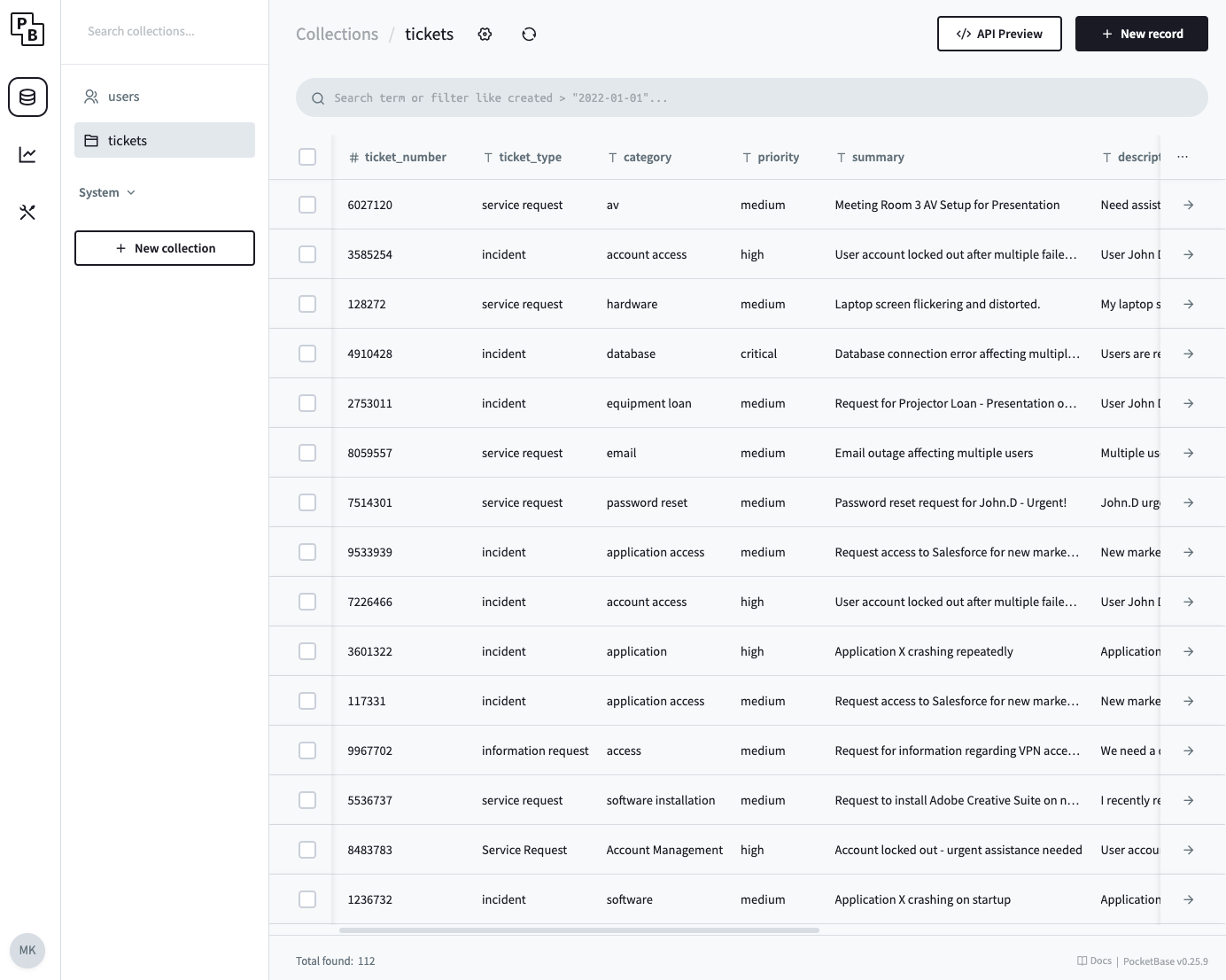
- Store generated tickets somewhere, Pocketbase will do.
- Decide on a model. Let’s go with Gemini.
Workflow diagram
Our POC workflow should then look roughly like this:
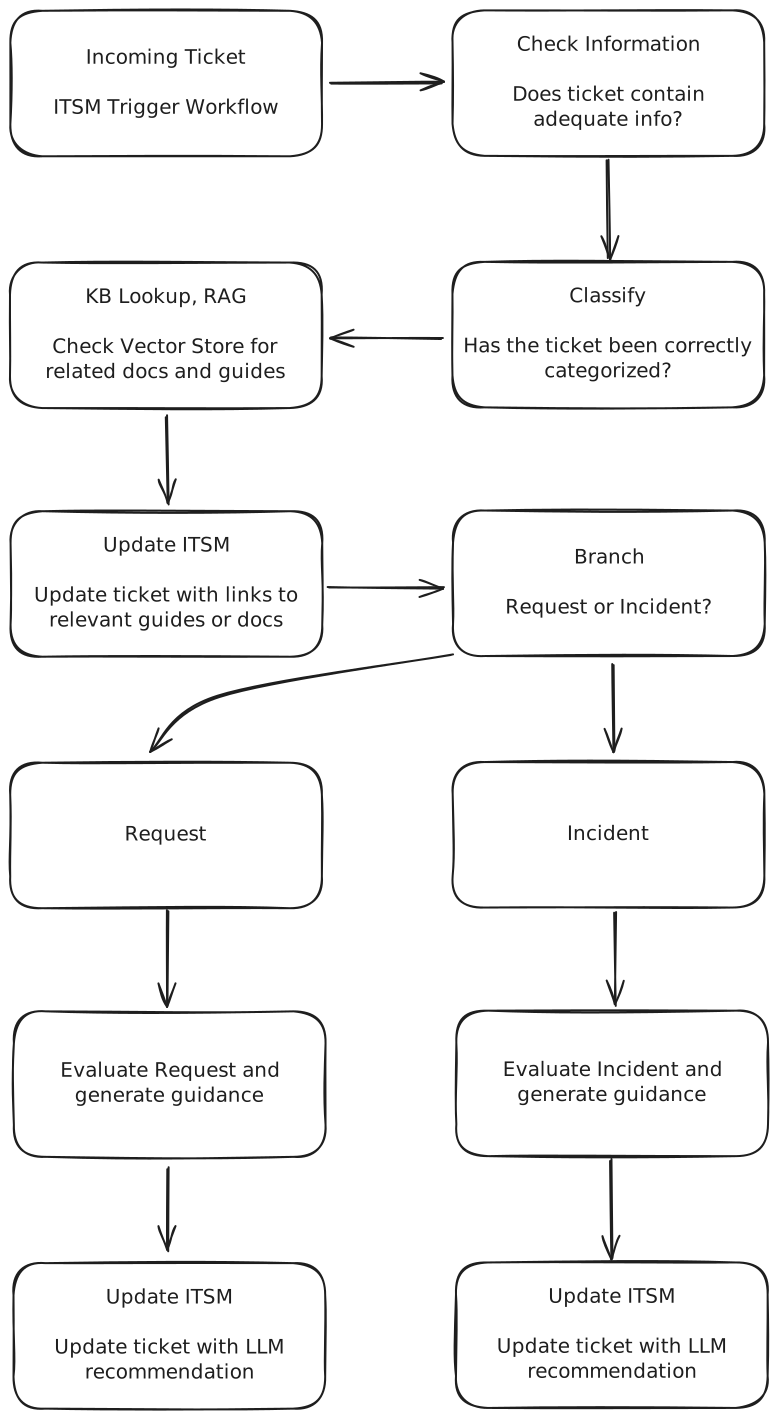
Implementation
Tech stack:
- Docker Desktop - containers
- n8n application - workflow engine
- Qdrant - vector database and search for RAG
- Pocketbase - to simulate a ticketing system and keep a record of all the tickets ive generated
- Google Gemini - Large Language Model used throughout this workflow
Workflow, in full:
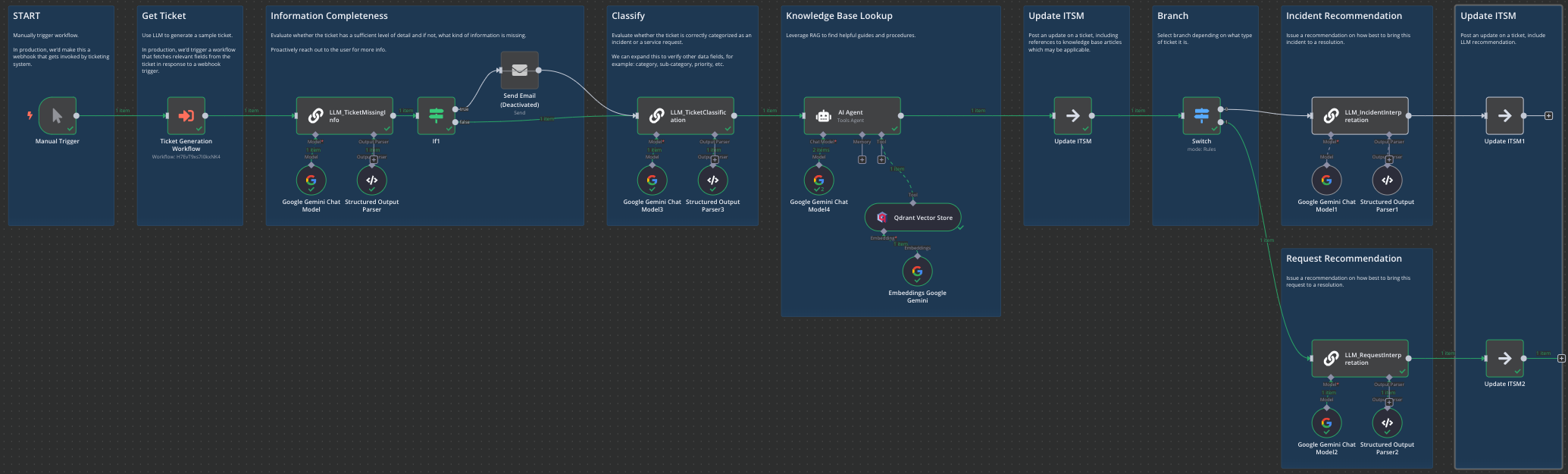
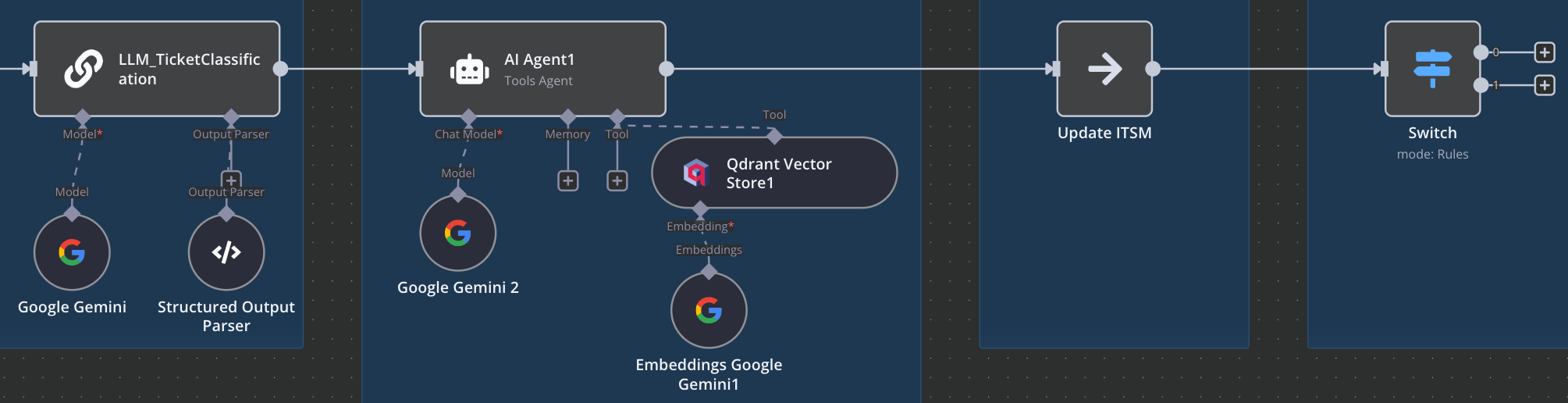
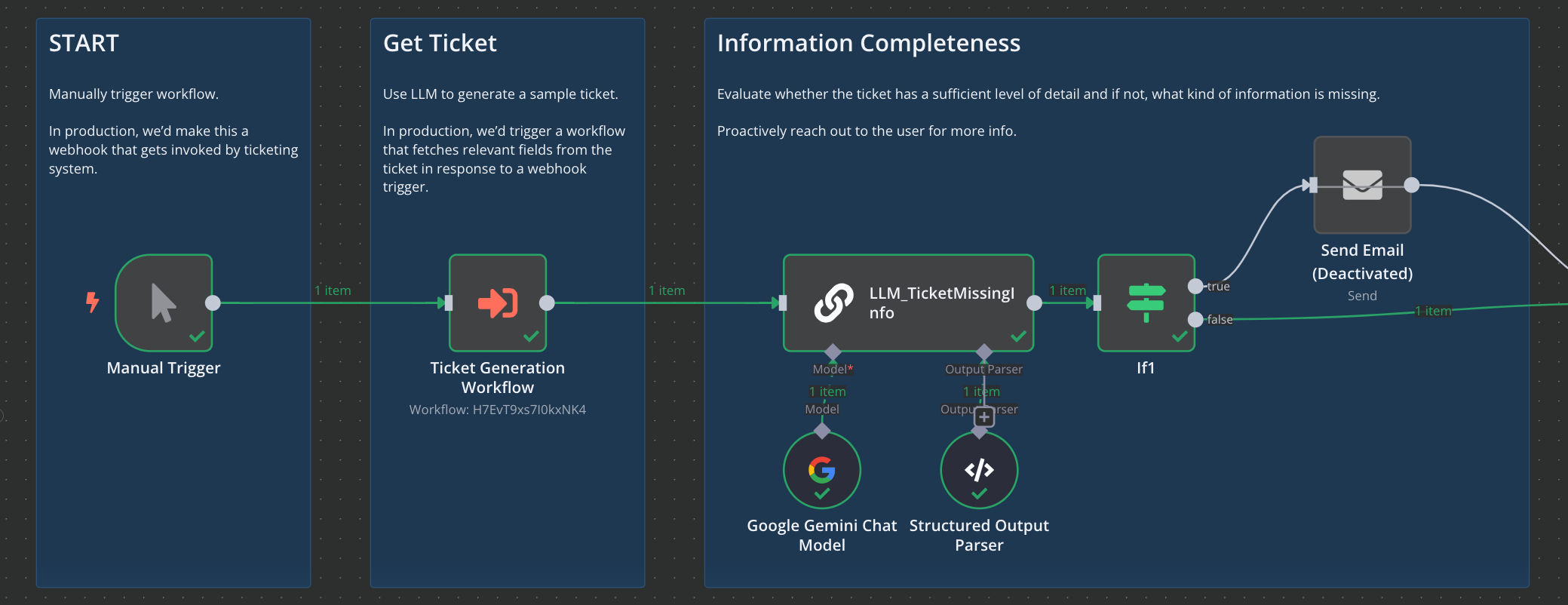
First, we manually trigger the workflow in n8n. We then use an LLM to generate us a ticket and provide a response that structured as .json. This generation step is a substitute for a real ITSM (ticketing) system. Then we evaluate the ticket for completeness and assess whether the level of detail is sufficient. If not, we send a chaser email (ideally, via the ITSM) prompting user for additional information.
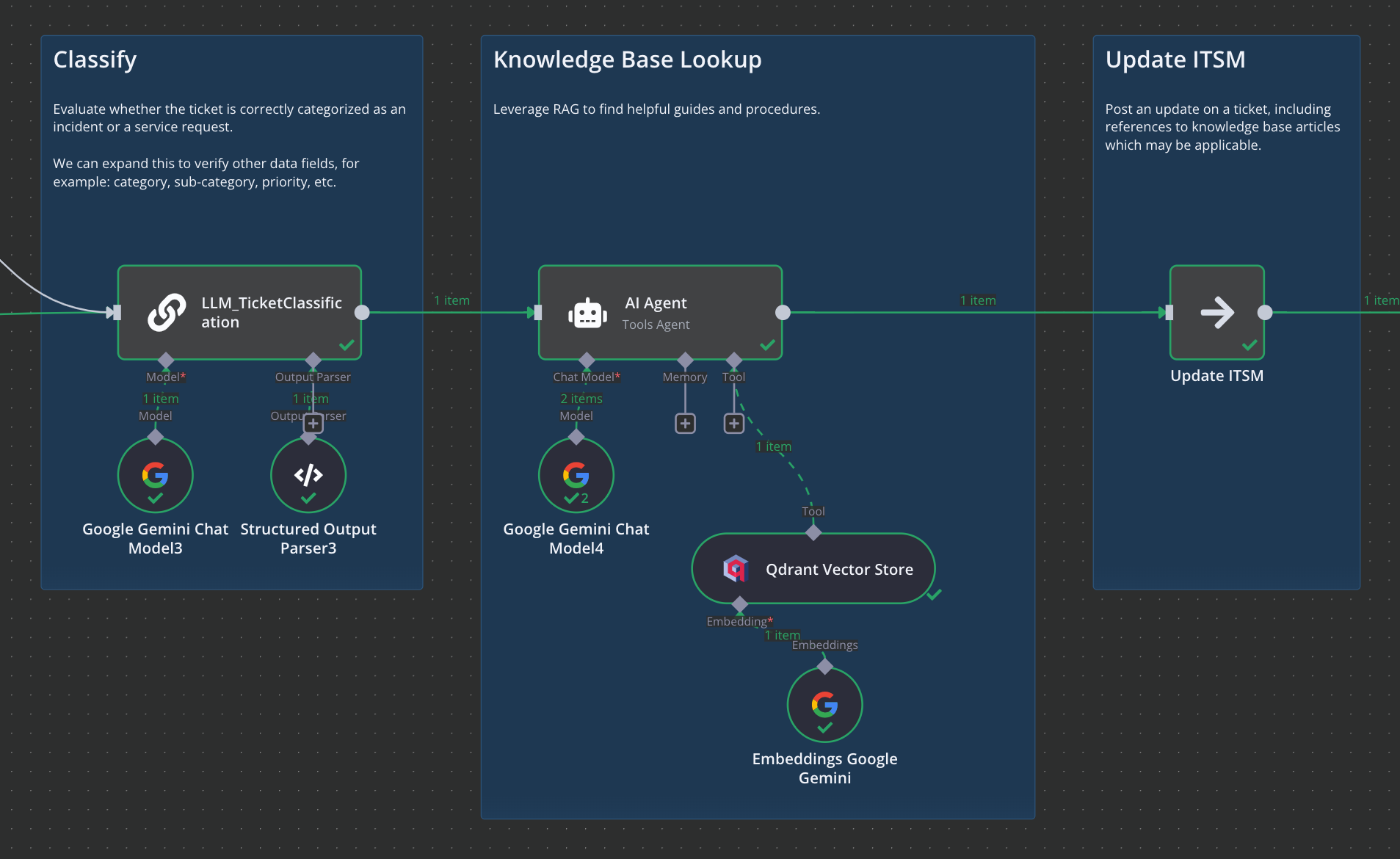
Now we review the ticket classification. We check whether it was correctly raised as either an incident or a request. At this stage we can also check whether other data fields are correct - think categories, sub-categories, priority, etc.
Then, we perform a RAG lookup thanks to Qdrant. I generated and pre-loaded a few troubleshooting guides. Here, an AI ‘agent’ is utilizing function-calling to perform a lookup in Qdrant and retrieve any documents that are relevant.
We’d subsequently take that information and post it to an ITSM system in the form of a ticket update. A Service Desk rep can then see that update, ideally referencing specific article names or links to where they can be found.
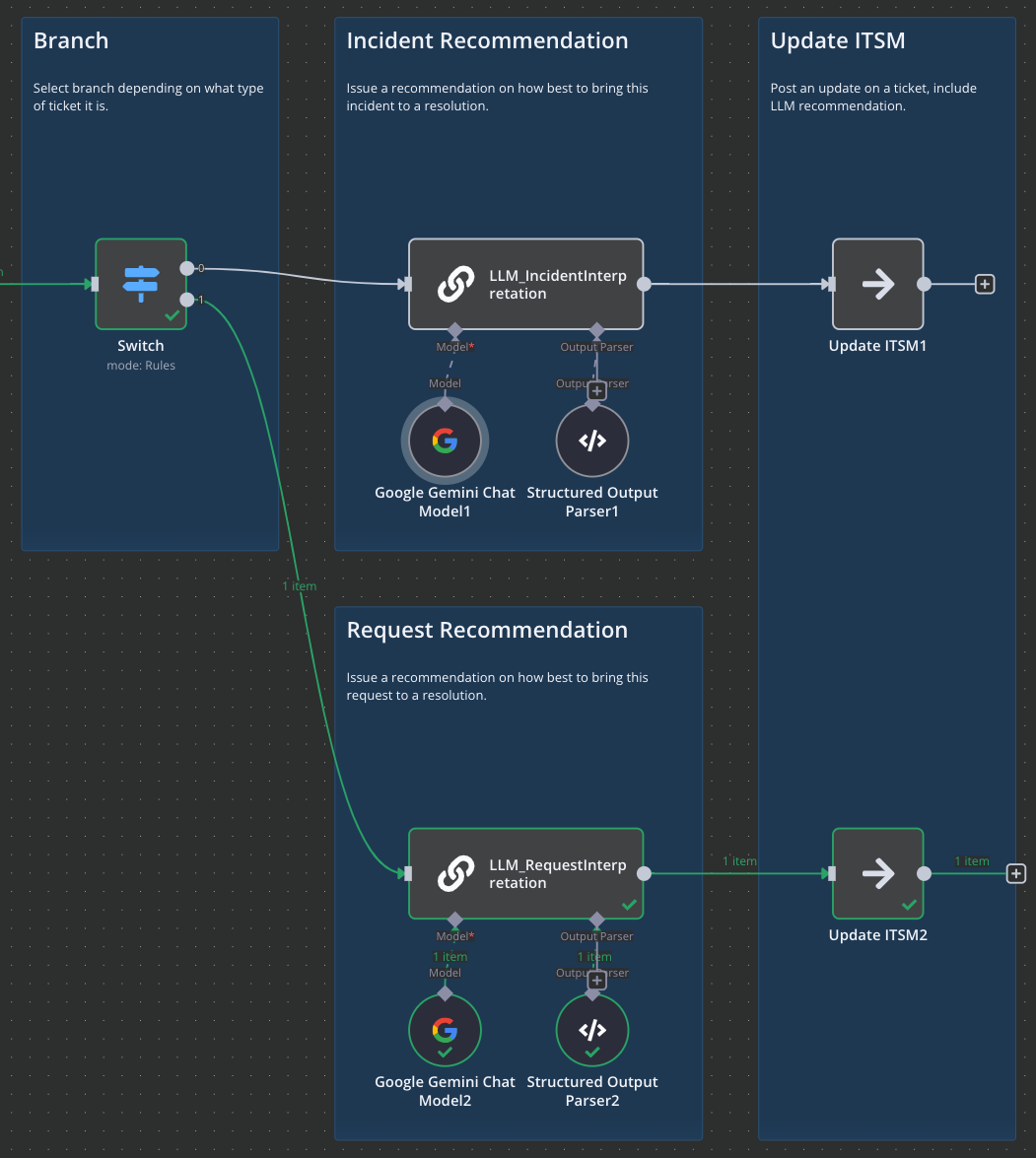
Here, we branch depending on whether ticket is an incident or a request. In this example we’re instructing the LLM to evaluate the ticket and do two things:
A. Issue a general recommendation to the analyst on how to approach the ticket
B. Provide a series of steps that can potentially be taken to resolve the ticket.
Finally, we push those recommendations into the ticket system in a form of a ticket update
It is up to the analyst to review this guidance and make a judgement call on how to proceed. They can leverage the LLM advice and documentation found by the agent, or they can choose to apply their own criteria and troubleshooting steps.
Test Results
Now, onto test results. I’ve picked out a few cases which I hope will illustrate to you the potential value of a similar workflow.
Example 1 - click to expand
Ticket:
- Ticket Number: 6027120
- Ticket Type: service request
- Ticket Category: av
- Ticket Priority: medium
- Ticket Summary: Meeting Room 3 AV Setup for Presentation
- Ticket Description: Need assistance setting up the AV equipment in Meeting Room 3 for a presentation on Friday. * * * Projector needs to be connected to my laptop (HDMI), and the sound system needs to be tested. Please ensure the microphone is working. The presentation is scheduled for 10:00 AM.
- Affected User: jane.doe@example.com
- Ticket Created: 2024-01-26 00:00:00.000Z
- Ticket Status: open
(LLM) Information Completness
- missing_info: no
- missing_explanation: While the ticket provides a good overview of the required assistance, it would be helpful to know if the user has tested the equipment previously, or if this is the first time using the AV setup in Meeting Room 3. Also, it would be good to know the laptop model and operating system for compatibility purposes. Finally, knowing if there are specific file types that need to be supported by the projector could help ensure a smooth presentation. However, these are minor details and the ticket is sufficiently clear to dispatch.
(LLM) Retrieval-augmented generation (RAG)
- output: I found no directly relevant articles in the knowledge base for AV setup in a meeting room.
(LLM) Recommendation for Analyst
- request_advice: This service request requires on-site assistance to set up AV equipment. Coordinate with Jane Doe to schedule a time before Friday’s presentation, allowing ample time for setup and testing. Confirm equipment availability and compatibility (HDMI connection for laptop, sound system, and microphone). Document the successful setup and any troubleshooting steps taken.
- request_steps:
- Contact Jane Doe to schedule a convenient time for AV setup and testing in Meeting Room 3.
- Gather necessary equipment: laptop (for testing), HDMI cable, and any required adapters.
- Go to Meeting Room 3 and check projector and sound system are available.
- Connect the laptop to the projector via HDMI.
- Test the projector, ensuring the laptop display is mirrored or extended as needed.
- Test the sound system: connect the laptop to the sound system and play audio to verify functionality. Check volume levels.
- Test the microphone (if applicable): Ensure the microphone is connected…
Example 2 - click to expand
Ticket:
- Ticket Number: 7912920
- Ticket Type: incident
- Ticket Category: software
- Ticket Priority: medium
- Ticket Summary: Application X crashing intermittently
- Ticket Description: Users are reporting that Application X is crashing intermittently, especially during peak usage hours. The error message displayed is a generic ‘Application Error’ with no specific error code. This is impacting productivity. Affected users include those in the Sales and Marketing departments. We need to investigate the root cause and implement a fix as soon as possible. The crashes seem to be more frequent after the recent patch update. A temporary workaround is to restart the application, but this is disruptive to the workflow. Affected User: john.doe@example.com
- Ticket Created: 2024-01-20 00:00:00.000Z
- Ticket Status: open
(LLM) Information Completness
- missing_info: yes
- missing_explanation: To assist with troubleshooting, could you please provide a more specific timeframe for when the issue started, beyond just ‘after the recent patch update’? Also, it would be helpful to know the version number of Application X, and the patch that was applied. Furthermore, providing steps to reproduce the problem, if possible, and details about any troubleshooting steps already taken would greatly aid in resolving this issue. Knowing the specific number of users impacted would also help prioritize the issue.
(LLM) Retrieval-augmented generation (RAG)
output: The following KB articles may be helpful in resolving this ticket:
Knowledge Base: Investigating Application Crashes
(LLM) Recommendation for Analyst
incident_advice: This incident requires immediate attention due to the impact on productivity. Start by gathering more detailed information, such as specific times of the crashes, the actions users were performing when the crashes occurred, and if there are any commonalities in the affected users’ hardware or software configurations. Since the issue seems to be related to a recent patch update, investigate the patch’s known issues and rollback if necessary. Prioritize troubleshooting and aim to provide a fix as soon as possible, keeping users informed of progress and providing alternative solutions to maintain workflow.
incident_steps:
- Gather Detailed Information: Contact affected users (e.g., john.doe@example.com ) and other users in Sales and Marketing to gather more details about the crashes, including the exact time of the crash, what the user was doing at the time, and any error messages that were displayed before the generic ‘Application Error’.
- Reproduce the Issue: Attempt to reproduce the crash in a test environment. If possible, use a configuration that mirrors the environment of the affected users.
- Review Application Logs: Access and review the application logs for Application X. Look for any error codes, warnings, or patterns that could indicate the root cause of the crashes. Check both the client-side and server-side logs.
- Investigate Recent Patch Update: Review the release notes for the recent patch update. Check for known issues or compatibility problems that could be related to the crashes.
- Check System Resources: Monitor the system resources (CPU, memory, disk I/O, network) during peak usage hours to identify any bottlenecks that may be contributing to the crashes.
- Test Workarounds: Confirm the workaround of restarting the application. Document the steps for users.
- Implement a Temporary Fix: If the root cause is identified, implement a temporary fix or workaround to mitigate the impact on users.
- Test and Deploy Permanent Fix: If the root cause is identified, implement and test a permanent fix. After testing, deploy the fix to the production environment.
- Communicate with Users: Keep affected users informed of the progress, provide updates on the investigation, and communicate any workarounds or temporary fixes.
- Escalate if Needed: If the issue cannot be resolved promptly, escalate the incident to the appropriate team (e.g., application developers, system administrators).
Example 3 - click to expand
Ticket:
- Ticket Number: 6118864
- Ticket Category: shared drive access
- Ticket Priority: medium
- Ticket Summary: Request access to the Marketing Shared Drive
- Ticket Description: I need access to the Marketing Shared Drive to collaborate on upcoming campaign materials. My username is jsmith and my employee ID is 12345. I require read/write access. Please let me know if you need any further information.
- Affected User: jsmith
- Ticket Created: 2024-01-20 00:00:00.000Z
- Ticket Status: new
(LLM) Information Completness
- missing_info: no
- missing_explanation: The ticket provides sufficient information for a Service Desk Analyst to process the request. The user has clearly stated the access they require (read/write) to the ‘Marketing Shared Drive’, along with their username and employee ID. No further information is critically missing to proceed with granting the requested access.
(LLM) Retrieval-augmented generation (RAG)
- output: Here are some potentially helpful KB articles for resolving this ticket: KB-TRBL-ACCOUNT-ISSUES: Resolving Common Account Issues (Lockouts, Password Resets, etc.)
(LLM) Recommendation for Analyst
request_advice: This is a straightforward access request. Verify the user’s identity and employment status. Check existing permissions for the Marketing Shared Drive to avoid granting duplicate access. If the user’s role aligns with the need for read/write access, proceed with granting the permissions. Document all actions taken.
request_steps:
- Verify User Identity: Confirm jsmith’s identity through Active Directory or other relevant systems using employee ID 12345.
- Check Current Permissions: Search existing permissions for the Marketing Shared Drive to see if jsmith already has access.
- Determine Access Level: Assess if read/write access is appropriate based on jsmith’s role and the nature of the campaign materials.
- Grant Access: Grant read/write permissions to the Marketing Shared Drive for jsmith, if appropriate.
- Document Changes: Record the date, time, and changes made to the permissions. Note the rationale for granting access.
- Test Access: Request jsmith to test access to the shared drive to ensure they can read and write files.
- Close Ticket: Update the ticket status to ‘resolved’ or ‘closed’.
Observations & Comments
Quality Instruction > Model Sophistication , to a point
A less capable model that is guided using specific and clear prompting will likely achieve better results than a sophisticated model with poor and unclear instructions.
The logic could be optimized so that we query LLM less frequently and get more answers per API call.
Very long or convoluted instructions may confuse the model or yield subpar results. Keep your prompts structured and to the point. Avoid ambiguity, use clear language, define the outcome you wish to achieve.
If you need the model to perform a large number of tasks it may be worth splitting those up into separate prompts. Preferably running in parallel or in series if you absolutely must chain responses from one task into another.
CoT models may eventually arrive at the a better answer, by “thinking” through a poorly-constructed prompt and figuring out what the user intended to ask. This comes at the expense of extra compute and processing time.
Synthetic data generation: models dont always adhere to instructions, generating multiple tickets when asked for one, or inventing new fields and properties. Larger models perform better / more consistently.
Synthetic data generation: some models like Gemini feel biased towards generating Incidents when given the option to choose between Incidents or Service Requests. Does the order of words matter? ie if in my instructions I say “Incidents or Service Requests” will it be biased towards incidents because that was mentioned first? If I flip the word order, does it flip the ratio? This is where the model requires some additional guidance to produce more random outputs.
Gemini was also biased towards generating similar tickets on first shot. If I asked it to generate only one ticket, it would almost always default to something like a Request to Install Adobe, App X Crashing, CRM Slow, etc.
If I asked it to generate several tickets, that’s where variety improved, but first item generated tended to be consistently similar across generations.
I had to introduce randomness by using a random number generator and pre-selecting ticket type and various other parameters to get consistently diverse results. Relying on LLM for randomness did not work very well, even when adjusting Temperature and Top K. It’s totally possible that all of the above is nonsense and this behaviour is purely due to how my prompt is structured. Some subtle hint steering the LLM towards certain types of responses.
Ascertaining ticket completeness and adequacy of included information was problematic - and I’m not convinced I got right. Exact same prompt, dataset, and question combinations would at times produce different results. Restraining the LLM from being overly pedantic was also a problem, where it would nitpick missing details. The model will also, at times, contradict itself or reach illogical conclusions.
I’m using both gemini-2.0-flash-001 and gemini-2.0-flash-lite-001. Full-fat version for the agent tool us / function calling and for reasoning. Lite version for everything else. You could probably get away with lite for most tasks, unless you need some serious reasoning, but then you might as well use the thinking models.
After inserting a value into PocketBase, I’m just passing the values through n8n flow instead of reading them from PB. This is because PB doesnt natively offer a trigger / task to trigge the n8n workflow, and I wanted to keep things simple for illustrative purposes.
Concluding Thoughts
In test case #1, LLM correctly identified that there are no guides available for solving that particular problem and issued a general recommendation.
In test case #2, LLM correctly identified a troubleshooting guide and referenced it for the analyst. It also produced sound troubleshooting recommendations.
In test case #3, LLM incorrectly identified a KB article for troubleshooting account issues with an access request.
Overall, quite promising. Workflow works mostly as intended and could be developed into a proper production tool. I think this illustrates that there is value in developing such systems. Whilst their utility may be marginal in trivial support cases, the time saved checking ticket completness, chasing users, and identifying relevant KB docs may prove valuable.
Extra
Bonus pic - Pocketbase with 100+ tickets I’ve generated with Gemini.